
Selection Statements
What are Selection Statements? Selection statements are simply one or more statements that may execute based on the value of an expression.
It may still sound confusing, so let's try with a real example:
"If the sky is blue, then we can fly today."
In the above statement, the selection statement is "if the sky is blue". "The sky is blue" can be either true or false but nothing in between.
This is known as a boolean expression.
The execution part is "fly today".
The selection statements in ACENji always start with the element that is part of the "IF" condition. We have tried to provide users with the best available option for a boolean expression by simplifying the logic. That's why the second selection a user has to make as part of the selection statement is to select a state.
The state represents the Boolean expression. In the "blue sky" example, it would be the verb "is".
The following are state boolean expressions supported by ACENji:
= (Equal Strict) - This is a simple comparison expression where two items are compared to see if they have an equal value. The items do not have to be numbers; they could be two words, for example, or two drop-down selections. For example, if a user checks whether the value of a text box is equal to 18.
<> (Not Equal) - This is the opposite of the above comparison, and it checks whether two items are not equal to each other. For example, the words "Computer" and "computer" are not equal. Example: if a user checks whether the value of a text box is not equal to 18.
< (Less Than) - This compares two sides and shows which side is smaller. For example, if a user checks whether the value of a text box is less than 18.
(Greater Than) - This compares which side of the statement is bigger than the other. For example, if a user checks whether the value of a text box is greater than 18.
<= (Less Or Equal) - This is a variation of the less than comparison, but this time it includes a clause if both sides are equal. For example, if a user checks whether the value of a text box is less than or equal to 18.
= (Greater or Equal) - This is a variation of the greater than comparison, but this time it includes a clause if both sides are equal. For example, if a user checks whether the value of a text box is greater than or equal to 18.
Exists - This checks whether an expression simply exists. For example, if a user has populated a value in a text box.
Not Exists - This is the opposite of the above statement, where a check is performed if the selection does not exist. For example, if a user has not populated a value in a text box.
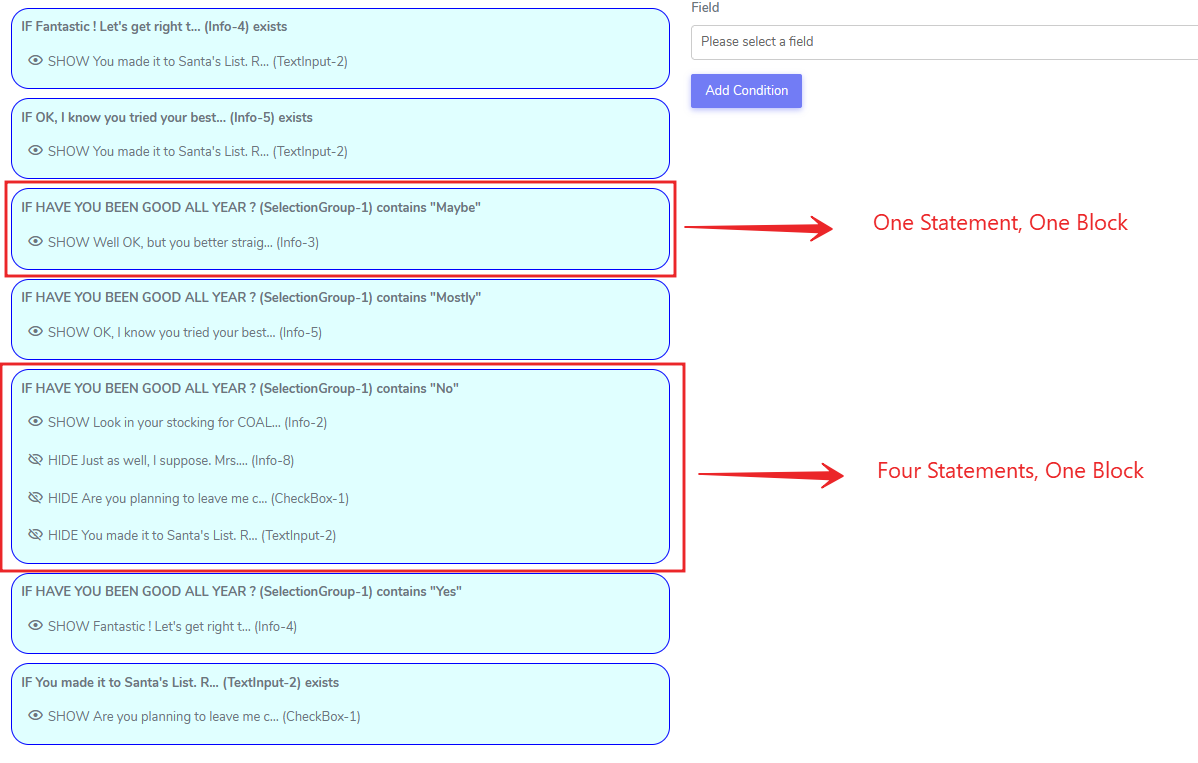
In ACENji, every conditional statement belongs to a block. A block is basically a logical group where one or more statements are grouped together as they are related to one particular field. Examples are shown below, where a single statement forms one block, and four statements form another block.
The statements inside the block are executed from top to bottom, and the execution of blocks is also from top to bottom.
Users can design very complex workflows using the above strategies.We advise that if nested logic is involved, no more than 9 levels of nested conditions should be used against a single field to prevent human error.
Questions?
If you have any questions, please don't hesitate to contact us.
Alternatively, you can submit an issue on this platform.
Useful Links:
Learn about the Numeric Input Element - https://help.acenji.com/#/./elements/numeric-input/index
Using the Modal Form Element - https://help.acenji.com/#/./elements/modal-form/index
Learn about the Rich Editor Element - https://help.acenji.com/#/./elements/rich-editor/index